Features of the AI assistant for e-commerce

e-shop.chat finds products, shows them as cards with price and stock, tells order status with shipment tracking, sends invoices and answers shipping and payment questions, all from your e-shop's current data and in the customer's language. Optionally it accepts a photo or a voice-dictated question. You get an admin with analytics, costs and an overview of what customers wanted and didn't find.

For customers

What the assistant does for your e-shop's customers

🔍

Product search

By description in the customer's own words, by product code or EAN (exact lookup, not full-text), or by OEM number in any notation: 587 15 90 10 equals 5871590-10. It builds the query from keywords and keeps searching until it finds a match.

🧩

Compatibility and dimensions

If your data allows it, it finds parts by machine model and brand or by dimensions (pitch, drive link count, piston diameter). We enable these tools based on what your API supports.

🖼️

Product cards

Photo, name, price and availability. In stock in green, sold out in red. A click goes straight to the product. Two columns on mobile, four in the enlarged window.

📦

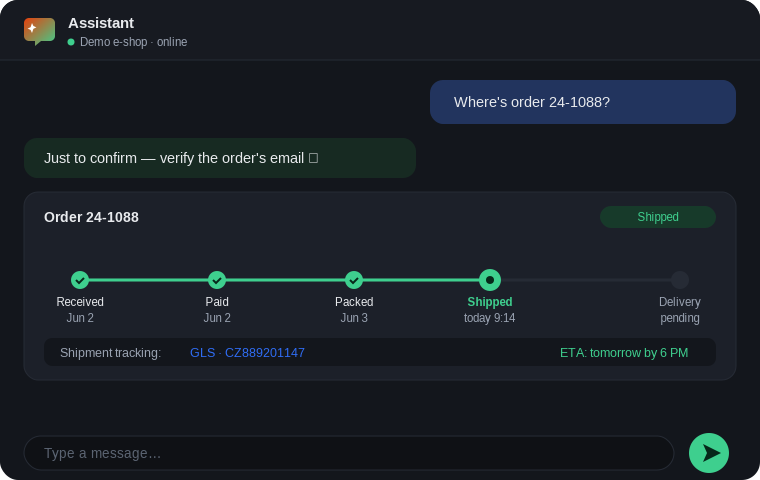
Order and shipment status

After verification with the order number and email: the status from your data, the parcel number and a clickable carrier tracking link.

📄

Invoices on demand

After the same verification, the customer gets the invoice as a downloadable PDF card. The link works for about 10 minutes and never appears in the conversation text.

🚚

Shipping and payments

Concrete prices, delivery times and terms from your e-shop's settings. No generic answers that stopped being true a year ago.

🌍

Six languages

Czech, Slovak, English, German, Polish and Hungarian. It replies in the language of the question and switches the window texts to match.

💱

Your store's currency

EUR, CZK, PLN or HUF, set per widget. The assistant never converts prices or guesses them from the customer's language.

💡

Suggested questions

Up to six clickable questions under the welcome. Nobody has to think how to start; one tap gets the conversation going.
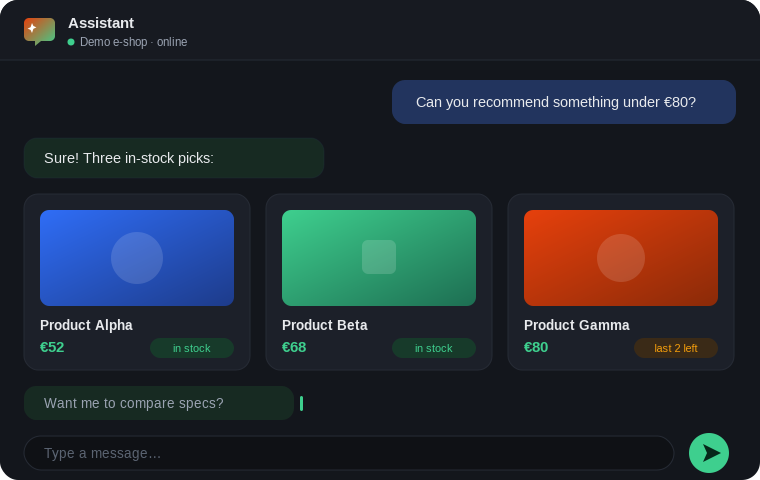
Demo: the assistant recommends in-stock products
Products as cards with price and stock; one click takes the customer to the product. Illustration with demo data; try the live assistant in the bubble at the bottom right.
Demo: the assistant checks order status
Order status only after email verification, with shipment tracking. Illustration with demo data; try the live assistant in the bubble at the bottom right.

Plus the details that decide whether people finish a chat: answers type out live like in ChatGPT, the window can be enlarged, on mobile it opens full screen, and an ongoing conversation continues on the next page for up to 24 hours. Customers can rate each answer with a thumb, and the whole conversation on closing the window.

A photo and voice instead of typing

Sometimes photographing a part is quicker than describing it, and in a workshop or a field, talking beats typing. So the assistant handles both; we enable each per widget as needed.

  • A photo from the customer. The customer adds an image from the gallery or, on mobile, straight from the camera. The assistant describes what it sees, such as the type of part or a disease on a leaf, and searches the catalog accordingly; if unsure, it asks. The widget shrinks the photo before sending, so it's fast even on mobile data.
  • Voice dictation. The customer taps the microphone and speaks. The text appears as they talk, and the question sends itself when they finish, attached photo included. Works in all six widget languages.
  • The browser transcribes the speech (in Chrome via a Google service). Only the finished text reaches us; we don't store audio. Dictation works in Chrome, Edge and Safari; in Firefox there's no microphone and the customer types as usual. Conversation history keeps only the text, not the photo.
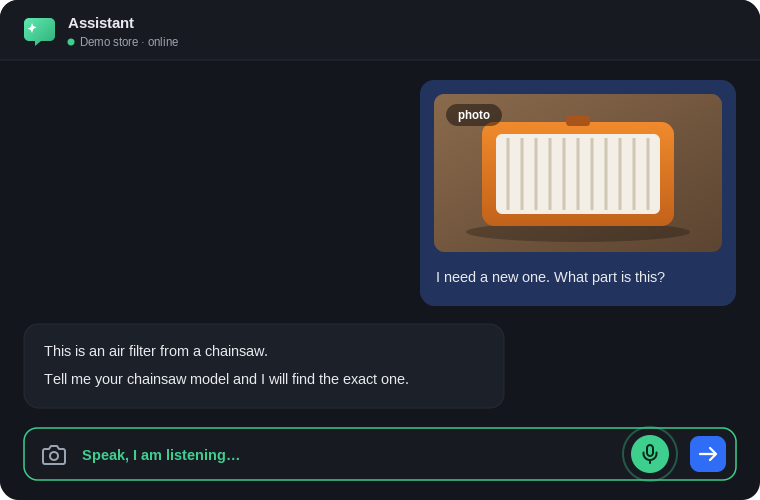
Illustration: a customer sends a photo of a part to the chat and dictates the question; the assistant describes what it sees in the photo
The customer sends a photo and dictates the question; the assistant describes what it sees and asks for the model. Illustration.
For you, in the admin

What you see in the e-shop.report admin

💬

Conversations in detail

Filter conversations by widget, country and satisfaction. Each detail shows the full transcript, what the assistant looked up, what the API returned and how long it took.

📊

Analytics

Trends, a day × hour heatmap, the share of conversations outside business hours, customer countries, ratings, AI-estimated resolution and the topics people ask about.

💸

Costs to the cent

What the AI cost per widget and per conversation, plus a daily spending cap so even an unexpectedly busy day won't burn your budget.

🛒

Unmet demand Enterprise

AI groups what customers wanted and didn't find into a list with counts and quotes. A ready basis for extending your range; other plans get a preview.

🔧

More widgets, more e-shops

Each language version or extra e-shop gets a widget with its own language, currency, range description and allowed tools. Configurations can be cloned.

🔔

Email alerts

An email at 80% of the daily or monthly limit, and when the assistant stops answering, for example because your AI key ran out of credit.

Security

Tech for developers

You embed the widget with one line: <script src="https://chat.e-shop.report/widget/loader.js" data-widget-id="…"></script>. The chat runs in an isolated iframe and streams answers over Server-Sent Events. On the server, a .NET 8 orchestrator calls the Anthropic Claude language model and tools over your e-shop API (MCP-style REST). From the Business plan you can use your own Anthropic key. Your own button can open the chat via window.EsrChat.open(). Details: the For developers section of the home page.

Frequently asked questions

Can the assistant add products to the cart?›
Not yet. The assistant advises, shows the product and links to it; the customer completes the order on the e-shop. Building a cart in the chat is planned, depending on the e-shop's API.
Can customers send a photo or dictate their question?›
Yes, both are optional widget features. The assistant describes the photo and searches the catalog by it. Dictation turns speech into text in the browser (Chrome, Edge, Safari); only the finished text reaches us. Neither photo nor audio is stored in the conversation history.
Are all features included in every plan?›
Customer-facing features, yes. Plans differ in the number of conversations and widgets, history length and analytics; the full Unmet demand report is Enterprise-only. See Pricing.
Do shipment tracking and invoices work with every e-shop?›
Only if your e-shop's API returns them. Each widget gets only the tools your API actually supports. They're switched on in settings, not by a new deployment.
Can I open the chat from my own button on the website?›
Yes. The loader offers window.EsrChat.open(), close() and toggle(), so an "Ask the assistant" link in the footer or on a product page can open the chat.
Which language model does the assistant use?›
Anthropic Claude. A smaller model, Claude Haiku, classifies conversations for analytics. Other models are planned for the higher plans.

See the assistant with your own eyes

The live demo runs on sample shop data. In a 30-minute call we show you the assistant connected to your data and your customers' typical questions.